
Automating sales proposals with AI
Technical review: Microsoft Copilot Studio
In recent months, we at Cmotions have expanded our knowledge and expertise in low-code and no-code, specifically by building and implementing agents using Microsoft Copilot Studio. In this article, we want to discuss both the strengths and limitations of Microsoft Copilot Studio as a platform for improving productivity through automation. While its seamless integration with other Microsoft products and AI-driven tools offers tremendous potential for streamlining workflows, certain technical challenges, such as data indexing and precision in retrieval, highlight areas in need of improvement. Moreover, this discussion will explore alternative solutions that can complement or even exceed Copilot Studio's capabilities in addressing these challenges. Through a balanced review, we hope to provide valuable insights for companies seeking efficient and innovative tools to optimize their operations.
1. What is Microsoft Copilot Studio?
Microsoft presents Copilot Studio as an advanced platform designed to increase productivity by integrating AI-driven tools into various workflows. Through seamless integration with other Microsoft products, Copilot Studio facilitates the development of advanced agents that can streamline operations, improve efficiency and drive innovation within organizations.
We decided to leverage the capabilities of Copilot Studio to create use cases that automate tasks without extensive programming knowledge. An important task that consumes a lot of time for Cmotions' sales department is generating new sales proposals for our customers. Therefore, we were tasked with developing an agent capable of generating sales proposals with minimal input.
2. Why use Copilot Studio?
Copilot Studio offers several benefits for companies looking to streamline their workflows and improve operational efficiency. In terms of practical application, Copilot Studio excels at tasks such as:
-
-
- Handling repetitive tasks to ensure consistent and high-quality results.
- Streamlining workflows by integrating AI-driven tools into business processes.
- Facilitating low-code/no-code development for customized automation solutions.
- Seamless integration with Microsoft tools
-
While Copilot Studio remains a very capable tool with the potential to provide remarkable benefits, it is not without its challenges. During our use of it, certain technical limitations emerged that require further development and refinement. These shortcomings highlight areas where Copilot Studio could improve its capabilities to better meet user expectations. Addressing these issues will be crucial to maximizing its effectiveness and reliability in various workflows. This article addresses technical issues with Copilot Studio and outlines solutions to overcome them in your applications.
3. Development path for the Sales Proposal Agent
Back to our application, the sales proposal agent. To create a valuable sales agent, it must be consistent with previous proposals from our Cmotions sales force, both in content and style. We must use historical data to train the agent to provide accurate, context-aware answers and customized customer proposals. Training with examples is essential for consistency and effective communication in business contexts. This not only improves the quality of proposals, but also increases the efficiency of the sales process by reducing the need for manual intervention and supervision.
We created a table of scenarios and approaches based on historical customer queries. For example, if a customer had a question about AI implementation, we predefined the scope, approach and requirements (see table below). We expected Microsoft Copilot Studio to index the document and provide relevant information based on user prompts to the agent. However, we encountered technical difficulties in indexing the table data.
Scenarios
"The customer requests a scalable solution for reporting and analytics to support their growing business needs."
Approach
- Assess current reporting and analytics needs
- Design and implement scalable PowerBI infrastructure
- Create customizable reporting templates
- Incorporate real-time analytics features
- Provide training for staff on the new system
Requirements
- Scalable infrastructure for growing data volume
- Customizable reporting options
- Real-time analytics
Scope
To create a scalable reporting and analytics system using PowerBI.
4. What is data indexing?
Integrating relevant content into our agent requires an efficient method of quickly retrieving information from vast collections of documents and texts. Indexing is essential to achieve this. Copilot Studio organizes data using tools such as Microsoft Graph, Dataverse and semantic indexing to make large data sets structured and effectively searchable.
Microsoft Graph is an API platform that connects to Microsoft 365 services, enabling integration and interaction of data between apps such as Outlook, SharePoint, Teams and more. Dataverse, on the other hand, is a cloud-based data storage service that allows users to securely store and manage structured and unstructured data to support application development and data-driven operations through seamless integration with Microsoft tools and services.
These tools transform content into vectorized representations of attributes, enabling advanced search and response capabilities. By connecting to repositories such as SharePoint and using GraphSearch, Copilot Studio can access and search datasets. GraphSearch is a feature that connects to storage locations, such as SharePoint, using Microsoft Graph to open and search datasets.
Challenges with precision in indexing were noted. Testing identified mismatches in scenarios and ranges, suggesting that improvements in data entry methods and indexing accuracy are needed to ensure reliable search results. If you want to learn more about document indexing, check out the following source.
We conducted technical research to find the best solution for our agent. We tested different file formats and input methods with Microsoft's indexing, but found that it struggles to accurately index files and respond correctly to customer queries.
5. Address
We initially stored our CSV file containing the scenario table in SharePoint so that the agent could access data through a SharePoint URL and GraphSearch. Despite the access, tests showed that the agent's semantic index was inaccurate. It confused scenarios and linked them to incorrect scopes, requirements and approaches. For example, the agent linked the user request to scenario 2 and suggested approach B, but incorrectly added requirements S and scope Z, which belong to scenario 3. Therefore, we investigated alternative methods.
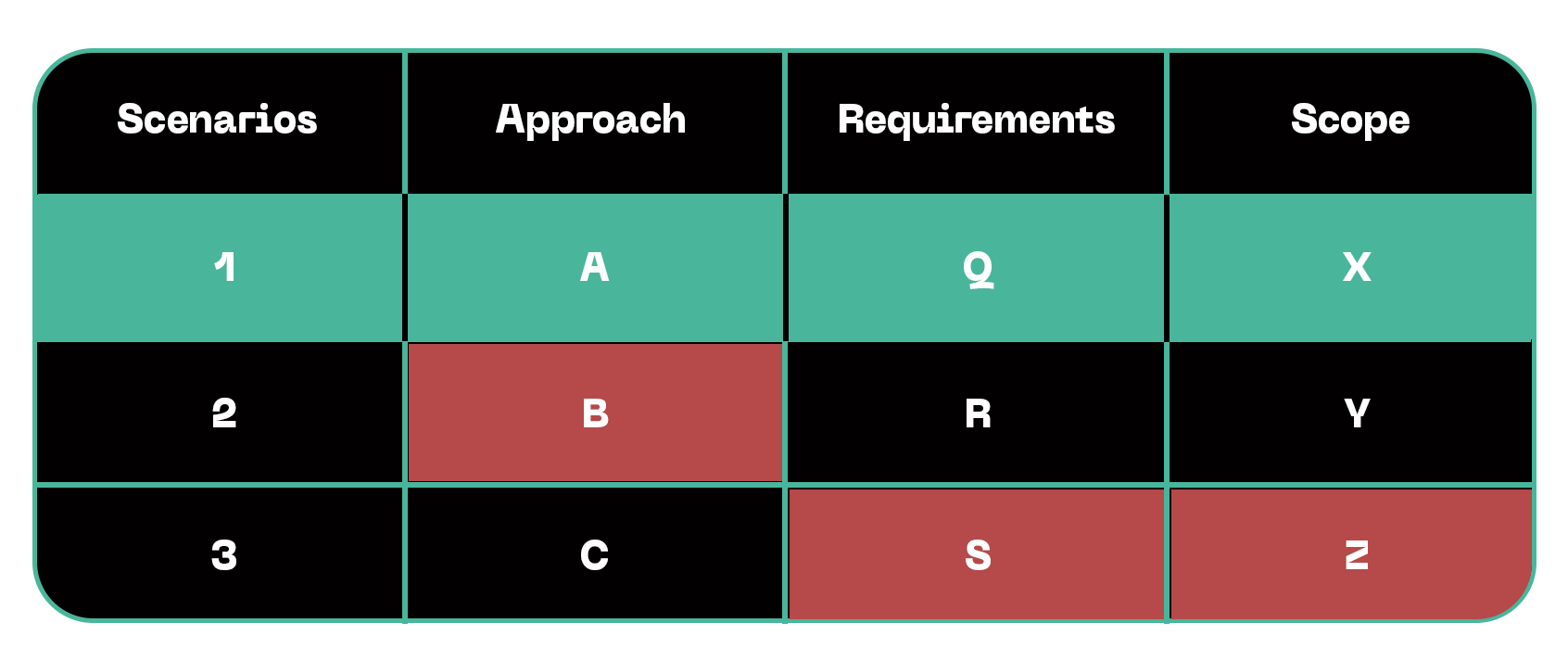
As it appeared, the table structure was lost when the CSV data was processed and indexed using GraphSearch on the file in SharePoint, causing the internal data to be misinterpreted. We chose to test an alternative file type to improve indexing. Our secondary approach included converting the CSV file to a Docx format, expecting that the agent would process continuous text more effectively than tabular files. Unfortunately, this method did not produce the desired accuracy in the results.
Because of previous failures, we decided to deliver the data locally. This method builds another semantic index by searching documents in the Dataverse environment and using a retrieval-augmented generative technique. Retrieval-augmented generative technique involves using pre-indexed documents to supplement generative models, thereby improving the relevance and accuracy of responses; in this case, it was applied to search locally stored documents in the Dataverse environment and provide contextually rich outputs.
When user input had a semantic similarity of 80% or more to the document scenario, the results were accurate. Dissimilar input, however, led to incorrect outputs. As a result, none of these approaches were appropriate for this project. To adapt the agent to custom data, it is essential that it can retrieve relevant internal data. Several solutions within Copilot Studio did not result in accurate, high-quality responses from our agent. Therefore, we had to look for other options.
6. Optimal approach: Azure AI Foundry for indexing
Azure AI Foundry was selected for agent data indexing because of its advanced semantic search capabilities and robust, scalable infrastructure. Unlike previous methods, Azure AI Foundry seamlessly processed user input in different scenarios, which significantly improved the accuracy and performance of the agent. By integrating this solution alongside Microsoft Copilot Studio and Power Automate, the project achieved a remarkable improvement in response quality and efficiency, handling even complex scenarios with precision.
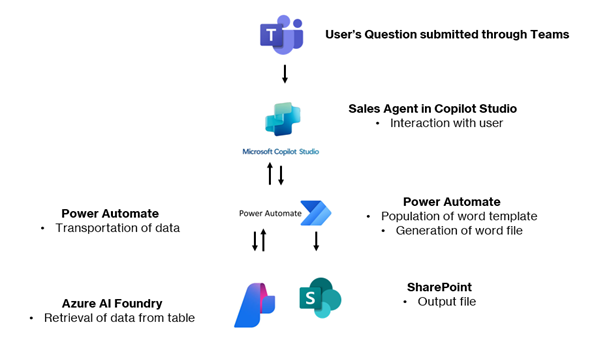
Although Microsoft Copilot Studio excels at automation tasks and provides streamlined workflows, it became clear that relying on this tool alone would not fully meet the needs of the project. Instead, the combination of Azure AI Foundry, Microsoft Copilot Studio and Power Automate proved to be the optimal solution. This integrated approach provided accurate data indexing, robust semantic search capabilities and improved accuracy in addressing nuanced scenarios, which ultimately improved the overall performance and quality of the project. As our example shows, proper evaluation and searching within the Azure stack for the best performing way to set up an agent is essential for quality results. A big advantage of Microsoft Copilot Studio is that it allows us to build working prototypes quickly; however, enterprise-level performance often requires adding more advanced tools to the solution.